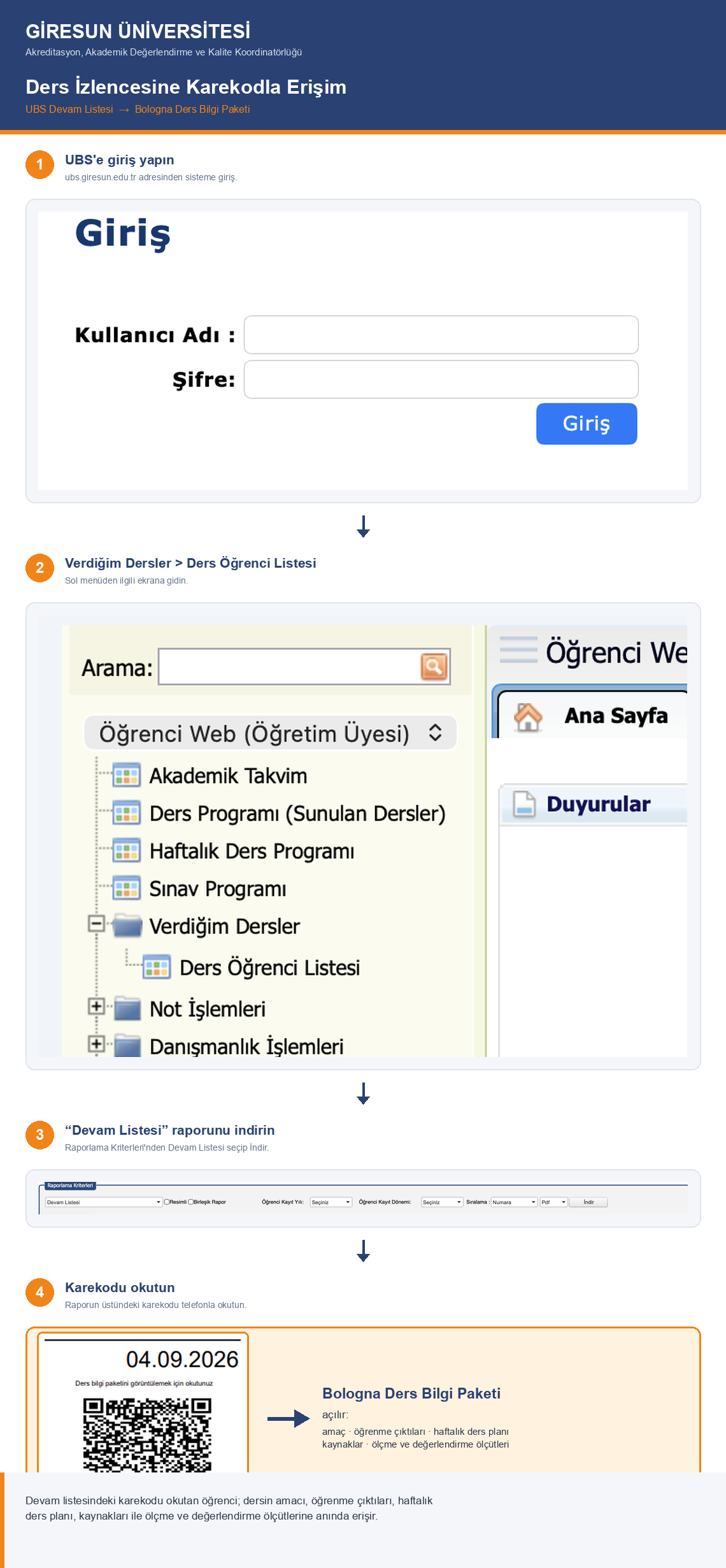
The process for sharing course syllabi with students and for monitoring class attendance records at our University has been redesigned through the Student Information Management System (UBS). Under the new arrangement, the “Attendance List” report that instructors download from ubs.giresun.edu.tr via the “My Courses > Course Student List” screen now carries a QR code for the relevant course at the top of the report. When this QR code is scanned, the course’s Bologna Course Information Package page is displayed directly, making the course’s objectives, learning outcomes, weekly course plan, resources, and assessment and evaluation criteria accessible to our students.
With this arrangement, it is no longer necessary to announce course syllabi to students against signature at the beginning of the term and to send the related documents to our Coordinatorship. Instead, the attendance lists of courses will be obtained through UBS and signed by students each teaching week, and recorded regularly. In this way, both class attendance and the fact that the syllabus has been announced to students are secured on a documented basis.
Thanks to this practice, the course syllabus will be accessible continuously throughout the term, not only at its beginning; our students will be able to follow the topic to be covered each week and the learning outcomes of the course.
Basis: Giresun University Rectorate, Accreditation, Academic Evaluation and Quality Coordinatorship — letter dated 04.09.2026 and numbered E-50169252-100-206074 (Distribution: To All Academic Units; Action: Department of Student Affairs).